



How to share Facebook and Instagram access through Meta Business Suite

15
February
2024

To share Facebook and Instagram access, create a business portfolio in Meta Business Suite, add your Page and professional Instagram account, then invite the person by email and select assets and tasks. No passwords change hands.
In short
- Business Manager is now called a business portfolio and lives in Meta Business Suite.
- Order: create a portfolio → add the Page → connect Instagram → invite people.
- You can add Pages where you have full control, and professional Instagram accounts only.
- Contractors get partial access to specific assets; agencies get partner access.
- Keep at least two people with full control and two-factor authentication on.
Facebook Business Manager is now called a business portfolio and is managed through Meta Business Suite and Business settings. The process is the same: create a portfolio, add assets, invite people and assign permissions. The screenshots below come from the Business Manager interface: some button names in Meta Business Suite have changed, while the logic is the same.
Step 1. How do you create a business portfolio?
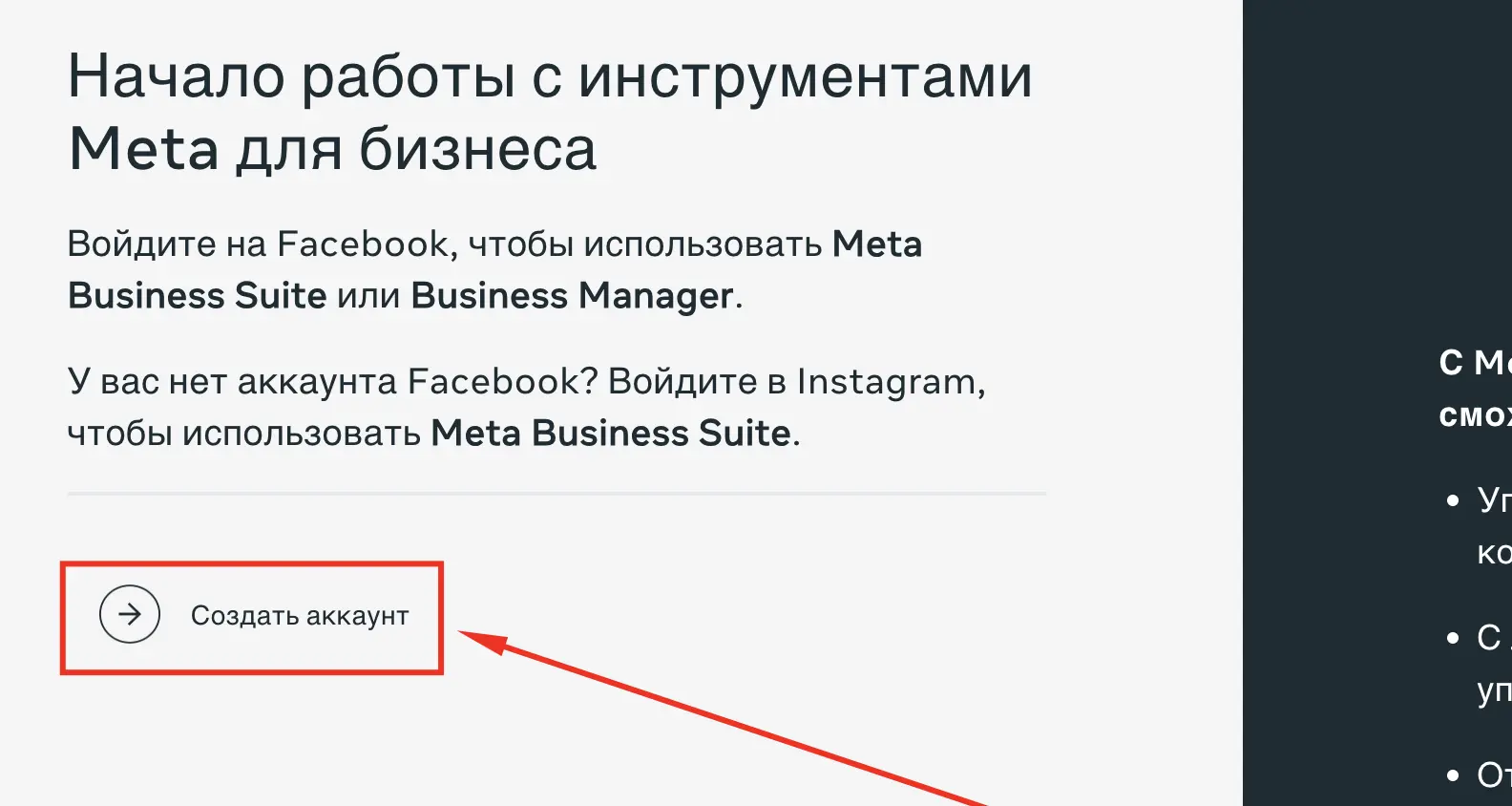
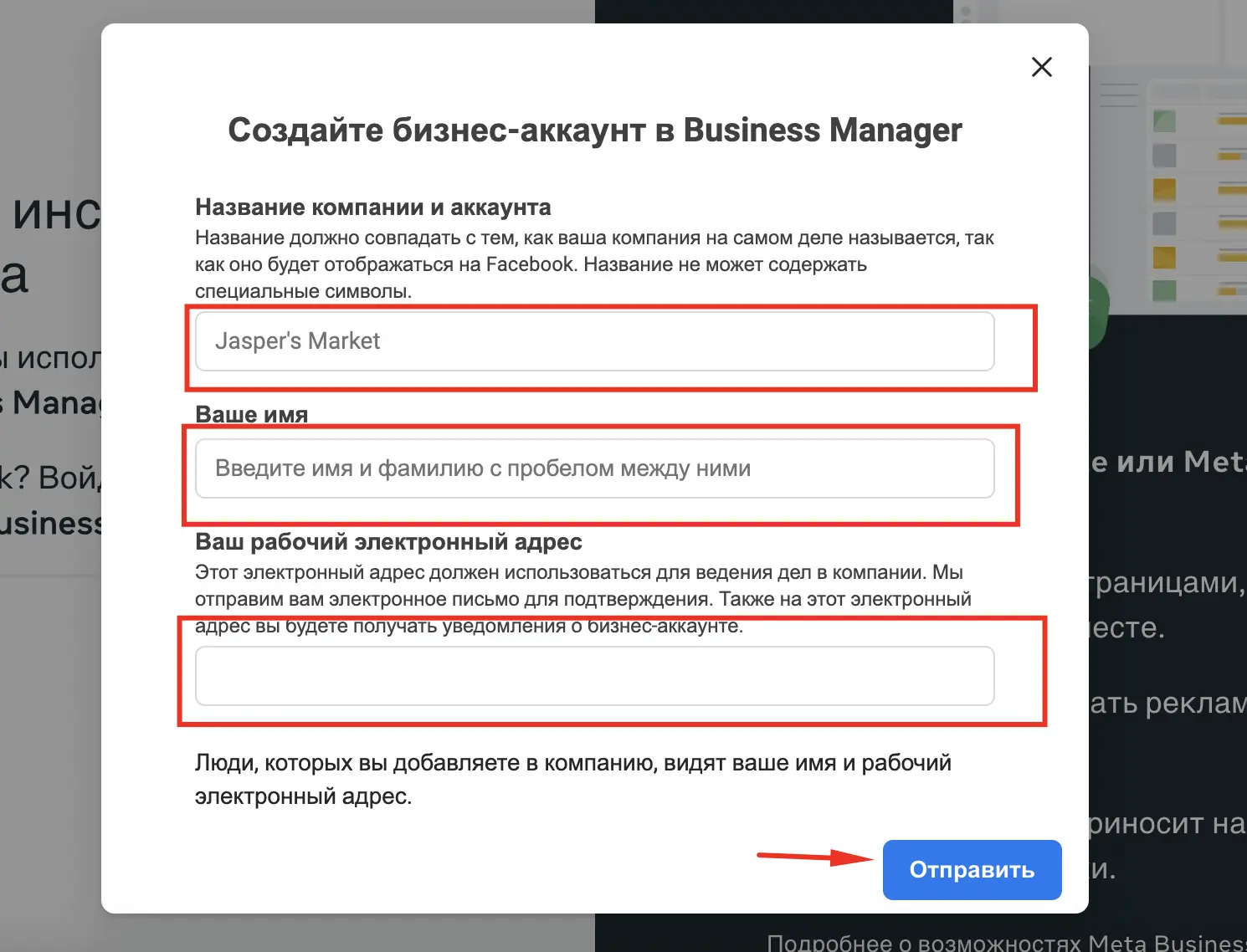
Go to business.facebook.com and log in with your personal Facebook account. Create a business portfolio by entering the business name, your name and a work email, then confirm the email.
Step 2. How do you add a Facebook Page?
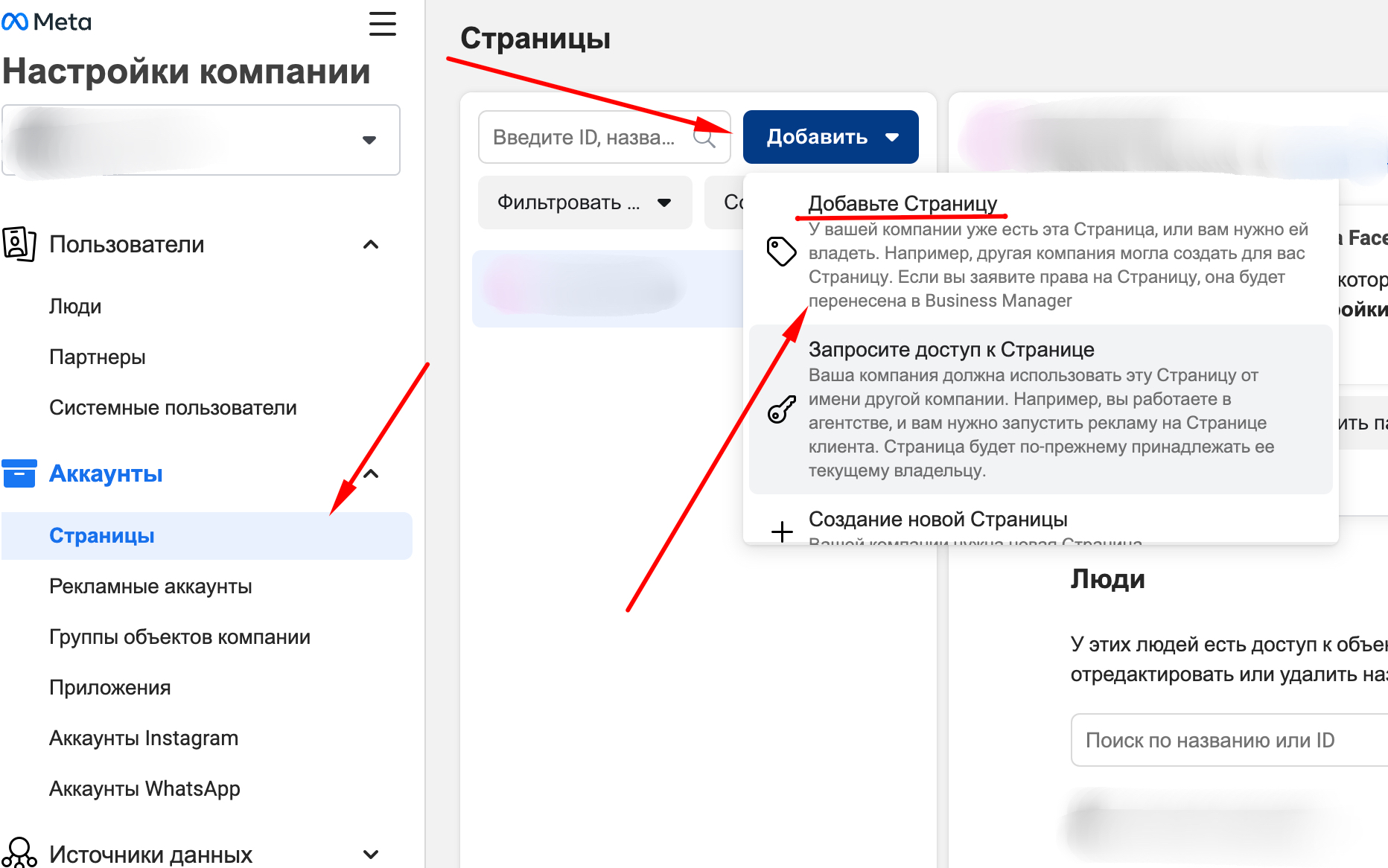
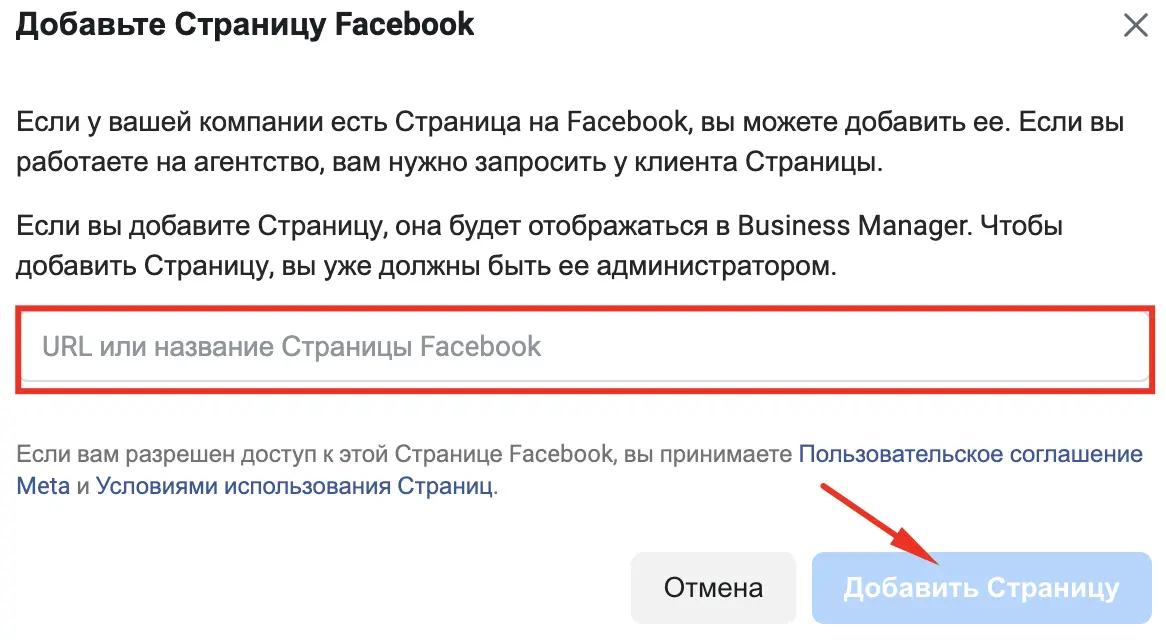
In Business settings, open Accounts → Pages → Add, then choose your Page or enter its name or URL. You can add Pages where you have full control. If the Page belongs to a client, choose Request access to a Page, and the owner approves it on their side.
Step 3. How do you connect Instagram?
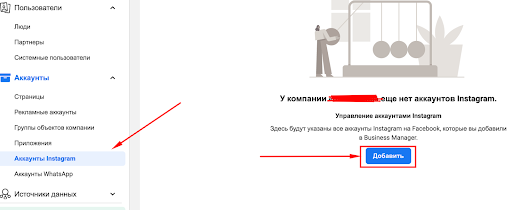
Under Accounts → Instagram accounts, click Add and log in to Instagram. The account must be a professional account: business or creator. A personal account switches to professional in Instagram settings in a minute.
Step 4. How do you invite a team member and assign permissions?
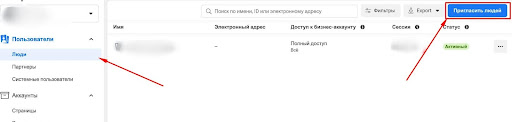
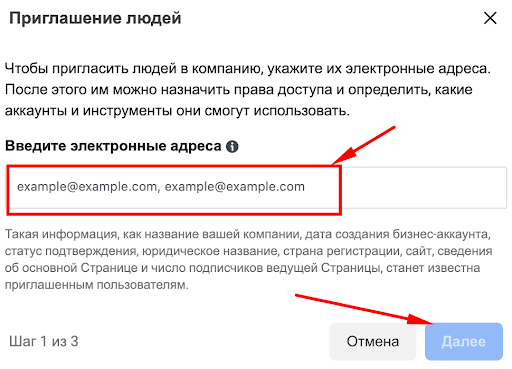
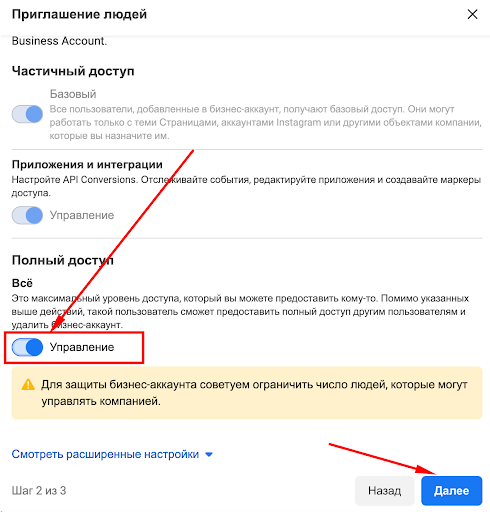
Under Users → People, click Add, enter a work email and choose full control or partial access. Then select the assets, the Page and the Instagram account, and the tasks the person can perform. Once they accept the invitation, the access appears in their own Meta Business Suite.
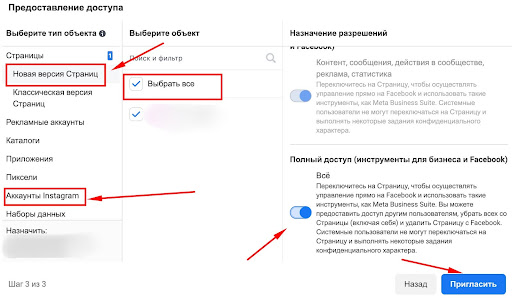
Step 5. How do you give access to an ad account?
For paid social, open Accounts → Ad accounts, select the account and click Assign people. For running campaigns choose campaign management; for reports, view performance. Keep the payment method with the business owner.
How do you give access to an agency?
If an agency with its own business portfolio runs your Page, add it as a partner: Users → Partners → Add, enter the agency's portfolio ID and choose the assets. The agency then assigns access to its own staff.
Why can’t I add a Page or Instagram account?
- No full control of the Page. Ask the owner to grant it or send an access request.
- Personal Instagram account. Switch it to a professional account.
- The asset is in another portfolio. A Page belongs to one portfolio; others get access as partners.
- The invitation did not arrive. Check the address and spam folder; invitation links expire after a while and can be resent.
Good practice
- Keep at least two people with full control in the portfolio so you never lose access.
- Give contractors partial access to the assets they need only.
- Turn on two-factor authentication for everyone in the portfolio.
- Meta renames menu items from time to time, so check the current path in Meta’s Help Center.
For Google Business Profile and TikTok, see our guide on giving an SMM manager access. We set up access as part of Facebook advertising and Instagram advertising.
Sources
- Meta: create a business portfolio
- Meta: add an Instagram account to a business portfolio
- Meta: add people to a business portfolio
- Facebook Help: give, edit or remove Page access
FAQ
What is a Meta business portfolio?
It is the new name for Business Manager. It holds Facebook Pages, Instagram accounts, ad accounts and the people with access to them.
Can I give Instagram access without sharing the password?
Yes. Add the professional Instagram account to a business portfolio and assign it to the team member with the tasks they need.
What is the difference between full control and partial access?
Full control lets a person manage the portfolio, its people and all assets. Partial access is limited to the selected assets and tasks.
How do I remove a former contractor?
Under Users → People or Partners, select them and click Remove. Their access to assets ends immediately.
Do I need a business portfolio for a single Page?
For one Page and one helper, Page access in the Page settings is enough. With ads or several contractors, a portfolio is easier.
Need Facebook and Instagram ads run end to end? Describe your product and region, and we will propose a campaign plan and set up access correctly.
Discuss social media adsTelegramWhatsApp
Contact us
We will answer all your questions.
 DUNS Number: 68-606-2061
 NCAGE Number: A3G3J






 "INNOVA CONSULTING GROUP"


Comments
Write comment