


IP telephony setup connects office, mobile and computer phones into one system: a cloud or on-premise PBX with numbers, voice menu, call routing and recording, integrated with your CRM so no call from a client is lost.
Discuss your projectTelegramWhatsApp
In short
- A cloud PBX for a small office usually starts within a few working days after the call scheme is agreed.
- An on-premise system, for example on Asterisk, suits companies that need full control over data.
- Integration with KeyCRM, HubSpot or Pipedrive: calls, recordings and missed-call tasks in client cards.
- Calls from ads and the website can be tracked in GA4, so you see which channel brings clients.
- The price depends on lines, users, branches and integrations.
What IP telephony setup includes
- Call scheme. Who answers which calls, during and after hours, with queues and forwarding.
- PBX choice. Cloud PBX or on-premise system based on your size, security needs and budget.
- Numbers. Ukrainian landline and mobile numbers, number porting, international numbers where the operator allows.
- Devices. IP phones, headsets, softphones on computers and mobile apps.
- Voice menu and recording. IVR greetings, call recording and storage rules.
- CRM integration. Calls and recordings in KeyCRM, HubSpot or Pipedrive client cards, click-to-call.
- Call tracking. Numbers per ad channel and call events in GA4.
- Training and support. Short training for staff and support under agreement.

Cloud or on-premise PBX?
A cloud PBX needs no server in the office: you pay per user, and staff can take calls from anywhere, which helps during power outages. An on-premise PBX runs on your server, keeps recordings inside the company and suits call centres with many lines. For most offices up to a few dozen people we recommend a cloud PBX; we explain the choice in the estimate.
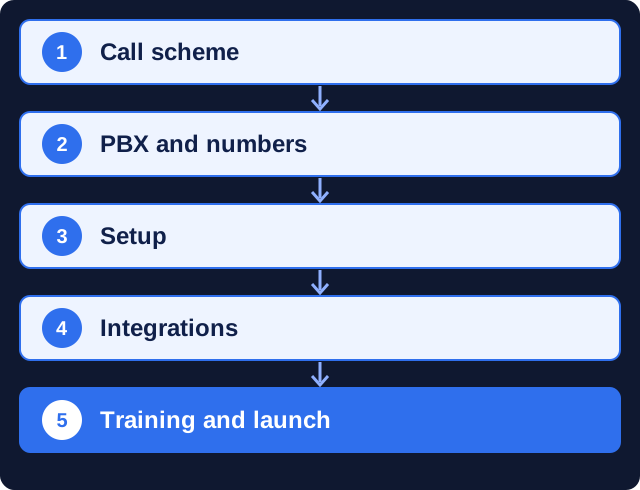
How we set up IP telephony
- Call scheme. Lines, users, routing and working hours.
- PBX and numbers. Choice of PBX, operator and number porting.
- Setup. IVR, queues, recording, devices.
- Integrations. CRM, call tracking and GA4.
- Training and launch. Staff training and test calls.
How long does IP telephony setup take?
In our experience a cloud PBX for a small office usually starts within a few working days after the call scheme is agreed. An on-premise system with equipment and CRM integration usually takes 2–3 weeks.
The term depends on number porting at the operator and delivery of IP phones. Your old numbers keep working until the switch, so clients do not notice the move.
What affects the cost
We quote after agreeing the call scheme. The price depends on:
- number of users and simultaneous lines;
- cloud or on-premise PBX;
- number of branches;
- CRM integration and call tracking;
- purchase of phones and headsets.
What we need from you
- Number of staff who take calls and working hours.
- Current numbers and operator contracts.
- Access to your CRM for integration.
- A person who approves the call scheme and greetings.
What you get and how we measure it
After launch you can see:
- all incoming, outgoing and missed calls with recordings;
- response time and missed-call rate per employee;
- calls by advertising channel in GA4 and the CRM;
- one system for office and remote staff.
Why a contracted team
Telephony mistakes cost clients directly:
- calls lost after hours without forwarding or a voice message;
- recordings stored without clear rules;
- CRM integration that creates duplicate contacts;
- ads running without call tracking, so their effect is invisible.
Working with a Kyiv team remotely
We work remotely with companies in the UK, the EU and North America: video calls, email, Telegram or WhatsApp, and shared documents for plans and reports. Kyiv is on UTC+2 (UTC+3 in summer), so our working day covers most of the UK and EU business day and the morning on the US East Coast. You get one project manager who is responsible for the timeline.
Why clients trust us
- More than 10 years in digital. Marketing MIX has been building websites and running marketing for over a decade, with the portfolio to show for it.
- Clients outside Ukraine. Our portfolio includes projects for KidSup and Cookiddoo in Canada and MBSoy, an architectural studio in Finland.
- One team for the whole chain. Strategy, website, SEO, ads and analytics sit with one team, so nothing gets lost between contractors.
- A registered, verifiable company. Our DUNS number is 68-606-2061 and our NCAGE code is A3G3J; both can be checked in the Dun & Bradstreet and NATO NCAGE databases.
- A real office in Kyiv. The studio is at 77 Velyka Vasylkivska St., Kyiv, and works remotely with clients in Ukraine and abroad.
FAQ
What is IP telephony?
Phone calls over the internet through a PBX that connects office phones, mobile apps and softphones, with routing, recording and CRM integration.
How long does it take to set up?
In our experience a cloud PBX for a small office starts within a few working days; an on-premise system with equipment takes 2–3 weeks.
Can we keep our current numbers?
Usually yes. Numbers are ported through the operator; old numbers work until the switch.
Which CRM can be integrated?
KeyCRM, HubSpot, Pipedrive and other CRMs with a telephony API.
Can remote staff use the office number?
Yes. Staff take and make calls from the mobile app or a softphone on their computer with the company number.
Does IP telephony work during power outages?
A cloud PBX keeps working in the data centre; staff answer calls from mobile apps when the office is without power. Calls can also forward to mobile numbers automatically.
Do you set up telephony for a foreign company office in Kyiv?
Yes. We agree the call scheme with your head office by video call, set up Ukrainian numbers and hand over documentation in English.
Related services
- Sales department automation
- Office local network setup
- IT infrastructure for companies
- Sales call analysis
- IT consulting and IT outsourcing
Ready to start? Describe your task in the form below. A manager replies with questions or a work plan and an estimate.


 DUNS Number: 68-606-2061
 NCAGE Number: A3G3J






 "INNOVA CONSULTING GROUP"