


Building IT infrastructure for a company means planning and setting up everything the team works on: workstations, network and Wi-Fi, servers or cloud services, email and file storage, backups, access rights, IP telephony and security, followed by ongoing support.
Discuss your projectTelegramWhatsApp
In short
- We start with an audit of what you have and a plan of what the business needs now and in two to three years.
- The design covers network, servers or cloud, backups, access rights and security.
- Setup is done in stages to keep your team working during the changes.
- In our experience, an office for a small team usually takes 1–3 weeks after equipment arrives.
- After launch we support the infrastructure under a monthly agreement.
What building IT infrastructure includes
- IT audit. Equipment, network, software licences, accounts, backups and security; list of risks.
- Design. Network diagram, server or cloud choice, backup scheme, access policy and budget for equipment.
- Network and Wi-Fi. Structured cabling, switches, routers, guest Wi-Fi separated from the office network, VPN for remote staff.
- Servers and cloud. On-premises servers or cloud services such as Google Workspace or Microsoft 365, file storage and shared drives.
- Backups. Automatic backups with copies outside the office and regular restore tests.
- Security. Access rights by role, two-factor authentication, antivirus and updates policy, protection of the network perimeter.
- IP telephony. Virtual PBX, call routing and recording, integration with CRM.
- Documentation and support. Diagrams, passwords stored in a password manager, instructions, then regular maintenance.
Office IT for a growing company
Infrastructure usually becomes a problem when the team grows from a few people to a few dozen, opens a second office or moves to hybrid work. At that point shared passwords, personal email accounts and files on laptops start to cost money: people lose access, data goes missing and nobody can say who has rights to what. We move the company to managed accounts, shared storage and role-based access, set up VPN for remote staff and document everything, so a new hire has a workstation and accounts ready within hours.
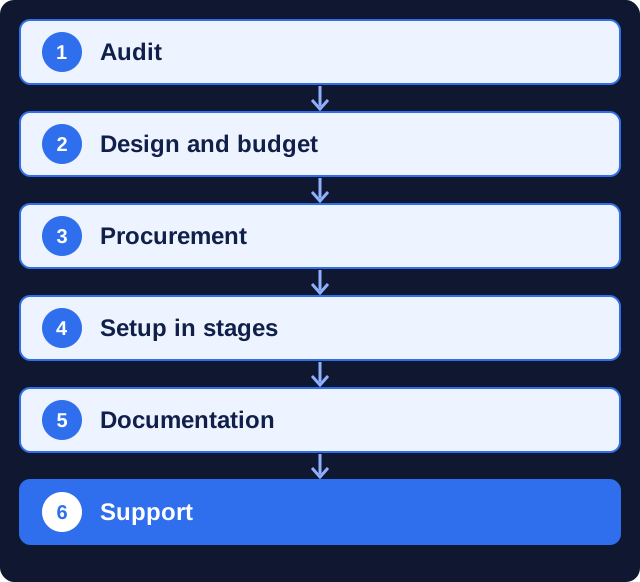
How we build IT infrastructure
- Audit. We inspect equipment, network, accounts and backups.
- Design and budget. We prepare the diagram, specification and equipment list.
- Procurement. We help choose and order equipment and licences.
- Setup in stages. We install and configure without stopping your work.
- Documentation. We hand over diagrams, access and instructions.
- Support. We monitor, update and fix under a monthly plan.
How long does IT infrastructure setup take?
In our experience, an office for a small team usually takes 1–3 weeks after the equipment arrives; a larger office or a move with several locations is planned over several weeks.
The timeline depends on the size of the office, cabling work, equipment delivery times, data migration from old systems and on internet providers.
What affects the cost
We quote after the audit. Equipment and licences are budgeted separately. Our work depends on:
- number of workstations and locations;
- on-premise servers or cloud services;
- cabling and network scope;
- data migration and security requirements;
- support level after launch.
What we need from you
- Access to current equipment, accounts and providers.
- Office plan and number of workstations, now and planned.
- List of software and services the team uses.
- A contact person for access and approvals.
What you get
After setup the infrastructure is documented and under control:
- working network, servers or cloud services and backups;
- access rights by role and two-factor authentication;
- diagrams, inventory and instructions;
- a support plan with response times.
Why IT infrastructure needs a team under contract
Problems we see in offices set up without a plan:
- one shared password for all accounts and no record of who has access;
- backups on a disk in the same room as the server;
- guest Wi-Fi on the same network as accounting;
- a single administrator who is the only one who knows how everything is set up.
Working with a Kyiv team remotely
We work remotely with companies in the UK, the EU and North America: video calls, email, Telegram or WhatsApp, and shared documents for plans and reports. Kyiv is on UTC+2 (UTC+3 in summer), so our working day covers most of the UK and EU business day and the morning on the US East Coast. You get one project manager who is responsible for the timeline.
Why clients trust us
- More than 10 years in digital. Marketing MIX has been building websites and running marketing for over a decade, with the portfolio to show for it.
- Clients outside Ukraine. Our portfolio includes projects for KidSup and Cookiddoo in Canada and MBSoy, an architectural studio in Finland.
- One team for the whole chain. Strategy, website, SEO, ads and analytics sit with one team, so nothing gets lost between contractors.
- A registered, verifiable company. Our DUNS number is 68-606-2061 and our NCAGE code is A3G3J; both can be checked in the Dun & Bradstreet and NATO NCAGE databases.
- A real office in Kyiv. The studio is at 77 Velyka Vasylkivska St., Kyiv, and works remotely with clients in Ukraine and abroad.
FAQ
What does building IT infrastructure include?
IT audit, design, network and Wi-Fi, servers or cloud services, backups, security and access rights, IP telephony, documentation and support.
Do you work outside Kyiv?
Cloud services, remote access and support work remotely; on-site cabling and equipment installation are done in Kyiv.
Cloud or own server?
For most small and medium teams cloud services such as Google Workspace or Microsoft 365 are easier to support. Own servers make sense for specific software or data requirements.
How long does setup take?
In our experience, usually 1–3 weeks for a small office after equipment arrives.
Do you support the infrastructure afterwards?
Yes, under a monthly plan with agreed response times.
Can you help with equipment purchase?
Yes. We prepare the specification and equipment list, compare offers and check the equipment on delivery.
Related services
Ready to start? Describe your task in the form below. A manager replies with questions or a work plan and an estimate.


 DUNS Number: 68-606-2061
 NCAGE Number: A3G3J






 "INNOVA CONSULTING GROUP"