


CRM implementation is choosing and setting up KeyCRM, HubSpot or Pipedrive around your sales process, connecting website forms, calls, messengers and email campaigns, then training managers so every lead is recorded and followed up. We do this for small and mid-size companies in Ukraine and abroad.
Discuss your projectTelegramWhatsApp
In short
- We start with your sales process and pick the CRM that fits it: KeyCRM, HubSpot or Pipedrive.
- Leads from website forms, calls, messengers and email go into the CRM automatically, with the source recorded.
- Email and SMS campaigns run from SendPulse or eSputnik on CRM segments; results go back to GA4 and the CRM.
- In our experience, a basic setup with pipeline, forms and user training usually takes up to 10 working days after the process is agreed and access is granted.
- After launch we support the system and adjust it as the team grows.
What CRM implementation includes
- Sales process review. How leads come in, who handles them, which stages a deal passes and where requests get lost today.
- Choice of CRM. A short comparison of KeyCRM, HubSpot and Pipedrive for your process, number of users and integrations, before you pay for licences.
- Setup. Pipelines, deal stages, fields, lead sources, roles and access rights, task and follow-up rules for managers.
- Website and form integration. Forms, calculators and order pages on your site send data to the CRM with UTM tags, so you see which channel brought the deal.
- Telephony and messengers. Your IP telephony provider, call recording and call cards in the CRM; chats from Telegram, Viber, Instagram and WhatsApp where the CRM supports them.
- Email and SMS campaigns. Contact sync with SendPulse or eSputnik, segments by deal stage, trigger emails after an order or a missed call.
- Automation. Tasks, reminders and notifications inside the CRM; links to other services through the CRM API, webhooks or n8n and Make.
- Analytics. Deal and revenue data next to GA4 conversions, so marketing reports show sales and cost per lead.
- Data migration, training and support. Import of contacts and deals from spreadsheets or an old CRM, instructions and sessions for managers, fixes after launch.
KeyCRM, HubSpot or Pipedrive: which CRM fits your business
We work with three systems and recommend one after looking at your process. A short guide:
- KeyCRM is a Ukrainian CRM built for online stores and service companies. It takes orders from the website, Prom and Rozetka, creates Nova Poshta and Ukrposhta shipments and keeps chats from messengers in one place. A good fit for e-commerce in Ukraine.
- HubSpot combines CRM, forms, email and a marketing contact base. It has a free CRM tier and suits companies where marketing and sales work with the same leads, including exporters working with the EU and North America.
- Pipedrive is a sales pipeline CRM for B2B teams: deals, activities and forecasts in a simple interface. A good fit for a small or mid-size B2B sales team with longer deals.
If you already use a CRM and it works badly, we check the setup first. Often the problem is in the stages and fields, and a move to another system is not needed. A longer comparison is in our guide How to choose a CRM for a Ukrainian business.
Integration with your website, forms and ads
A CRM pays off when every request lands in it without manual copying. We connect contact and order forms on WordPress, WooCommerce, Shopify, MODX or custom sites, pass UTM tags and the click ID from Google Ads and Meta Ads into the deal, and send the sale back to GA4 as a conversion. Then you see which campaign brought paying clients, and ads can be tuned on sales data. We test every form at launch, and under support we check that requests keep reaching the CRM.
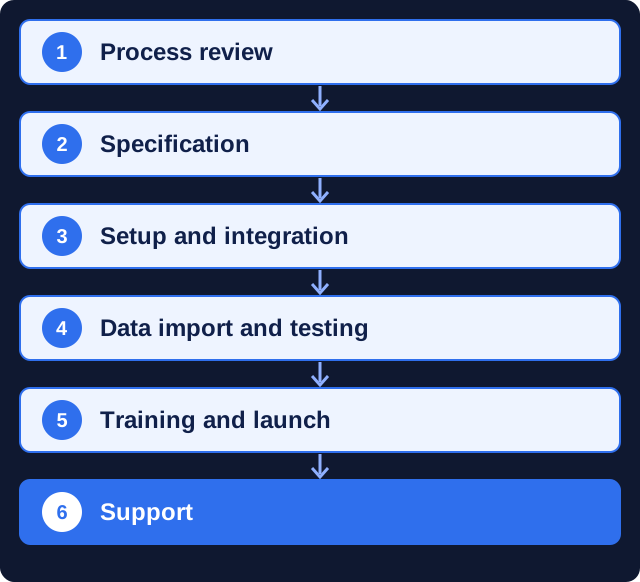
How CRM implementation goes
- Process review. We talk to the owner and managers and map how leads and deals move today.
- Specification. We agree the CRM, pipelines, fields, integrations and reports in one document.
- Setup and integration. We configure the CRM and connect the website, telephony, messengers and email service.
- Data import and testing. We move contacts and deals and test every lead source on real requests.
- Training and launch. We train managers and admins and switch the team to the CRM.
- Support. We fix issues and adjust the system as your process changes.
How long does CRM implementation take?
In our experience, a basic setup of KeyCRM, HubSpot or Pipedrive with one pipeline, website forms and user training usually takes up to 10 working days after the process is agreed and we get access to the systems. Projects with telephony, email campaigns, several departments, custom API work or data migration from an old CRM are planned in stages, and we set the timeline after the specification.
The timeline depends on the number of lead sources and integrations, the volume and quality of old data, the APIs of third-party services and how quickly your team tests and gives feedback.
What affects the cost of CRM implementation
We estimate after the process review, when the scope is clear. The price depends on:
- the number of pipelines, departments and users;
- lead sources to connect: website forms, telephony, messengers, marketplaces;
- email and SMS campaigns and their triggers;
- custom integrations through the API with accounting, warehouse or booking systems;
- data migration and the scope of training;
- the support format after launch.
What we need from you
- A person who knows the sales process and can answer questions within a day or two.
- Owner or administrator access to the CRM, the website, telephony and the email service.
- Your current lead data: spreadsheets, exports from an old CRM or email lists.
- Time from managers for testing and a training session.
What you get and how it is measured
After launch the CRM becomes the single place for sales data:
- every lead from the website, calls, messengers and campaigns recorded with its source;
- pipelines that show conversion by stage and by manager;
- tasks and reminders, so no request is left without a reply;
- sales data connected to GA4 and ad accounts for cost per lead and per sale;
- documentation of the setup and trained users.
Why CRM implementation is safer with a team under contract
A CRM set up without a clear process tends to be abandoned within months. The problems we fix most often:
- dozens of fields and stages nobody fills in;
- website forms whose integration broke, so leads never reached the CRM;
- duplicate contacts after an import without cleaning;
- managers who were never trained and keep working in spreadsheets and messengers;
- a system chosen by price that lacks the integrations the business needs.
Working with a Kyiv team remotely
We work remotely with companies in the UK, the EU and North America: video calls, email, Telegram or WhatsApp, and shared documents for plans and reports. Kyiv is on UTC+2 (UTC+3 in summer), so our working day covers most of the UK and EU business day and the morning on the US East Coast. You get one project manager who is responsible for the timeline.
Why clients trust us
- More than 10 years in digital. Marketing MIX has been building websites and running marketing for over a decade, with the portfolio to show for it.
- Clients outside Ukraine. Our portfolio includes projects for KidSup and Cookiddoo in Canada and MBSoy, an architectural studio in Finland.
- One team for the whole chain. Strategy, website, SEO, ads and analytics sit with one team, so nothing gets lost between contractors.
- A registered, verifiable company. Our DUNS number is 68-606-2061 and our NCAGE code is A3G3J; both can be checked in the Dun & Bradstreet and NATO NCAGE databases.
- A real office in Kyiv. The studio is at 77 Velyka Vasylkivska St., Kyiv, and works remotely with clients in Ukraine and abroad.
FAQ
What is CRM implementation?
It is choosing a CRM, setting it up for your sales process, connecting lead sources such as the website, telephony and messengers, moving existing data and training the team to work in it.
Which CRM is better for a small business: KeyCRM, HubSpot or Pipedrive?
KeyCRM suits online stores and service companies in Ukraine, HubSpot suits teams where marketing and sales share leads, and Pipedrive suits B2B sales teams with longer deals. We recommend one after reviewing your process.
How long does CRM implementation take?
In our experience, a basic setup with one pipeline, website forms and training usually takes up to 10 working days after the process is agreed. Projects with many integrations are estimated after the specification.
Can you connect our website forms and telephony to the CRM?
Yes. Forms, calls, messenger chats and email can create leads or deals automatically, with the source and UTM tags recorded.
Can you connect SendPulse or eSputnik to the CRM?
Yes. We sync contacts and segments, set trigger emails and SMS by deal stage and bring campaign results back to the CRM.
Can you move our data from spreadsheets or another CRM?
Yes. We clean and map the data, import contacts, companies and deals, and check the result with your team before the switch.
Do you support the CRM after launch?
Yes. We fix issues, add fields, pipelines and integrations as the business changes, and train new managers.
Related services
- Sales department automation
- Turnkey sales department
- IP telephony setup
- Email marketing
- Chatbot development
- IT consulting and outsourcing
Ready to start? Describe your sales process in the form below. A manager replies with questions or a work plan and an estimate.


 DUNS Number: 68-606-2061
 NCAGE Number: A3G3J






 "INNOVA CONSULTING GROUP"